Dvorak mode: My journey learning the ThreeLayout (3L). I've decided to document my journey and capture my thoughts in a diary / journal format while going through the process.
Why?: I enjoyed using Programmers Dvorak for the past 6 years, especially during software development sessions. However I had a few initial cons, which are the usual Vi(m) layout, and then later Emacs. Vim wasn't so bad, but when I started getting into Common Lisp, I switched back to Emacs, with Vanilla layout. As any Dvorak user can attest to, that required some finger gymnastics and became a pain after awhile. Swapping Alt with Ctrl eased that pain somewhat, and Lispy was a boon. I remembered using Xah Lee's Emacs keybindings in 2011 when I was getting into Emacs, so I decided to pick it back up, and most Emacs issues dissappeared afterwards.
Then another issue arose, I realised that after getting in the zone (flow state) and coding for two to three hours, both pinkies were sore. While Programmer's Dvorak made reaching symbols easier, there were times when numbers needed to be interspersed during typing, sometimes a lot. I've been ignoring it for the most part for the past couple years, and it never developed into anything. Yet, it kept annoying me. Of course, an ergo keyboard would solve that issue, if I could afford it. Unfortunately, I am not in that position.
I started researching, and began seeing Colemak DH being touted as a great alternative. The thing is, I was spoilt by the ease of reaching the symbols with my strongest fingers, and Colemak DH seem to stick closely to QWERTY's symbol layout. I was on the verge of trying it out, but I also kept seeing other alternatives pop up once in a while, Neo / CarpalX / etc. The more I looked into Neo or Bone, the appeal was there, especially since it catered to programming. As I was about to give Bone a try, I saw their alternative layout section with a mention of an English focused layout, 3L. That sealed the deal for me, and the rest of this post is the result of that.
As part of the learning process, I am going cold turkey, just as I did for Dvorak. I switched my Windows and FreeBSD bindings. The following is written solely with 3L.
3L mode:
May 15th, 2024
First post typed using Three Layout, while learning, to capture my thoughts and document my progress.
- Dvorak 1 year, Progrommers Dvorok 6 years
- Started 3L cold turkey May 15, 2024
- Switched Windows (ReNeo) and FreeBSD (setxkbmap us 3L) layouts
- Using ReNeos onscreen keyboard
- Trained on Klavaro up to level 20. Home and top rows.
May 16th, 2024
- I am left handed, and found it interesting that I spent more time training the left keys with more focus. Would default to Dvorak while training, but making a mistake would "reset" my fingers.
- The right home keys flowed almost unconsciously. After checking, home row has similarities with Dvorak. e, t, n, s
- Still confusing O with A...o lat.
- Wrote company emails. Slow, not painful
- Retrain up to level 20 in Klavaro. Home and top rows.
May 17th, 2024
- Started from level 20, learning bottom rows, up to level 31
- Turned off ReNeo on-screen keyboard and only reference for symbols. Chnfidence boosted.
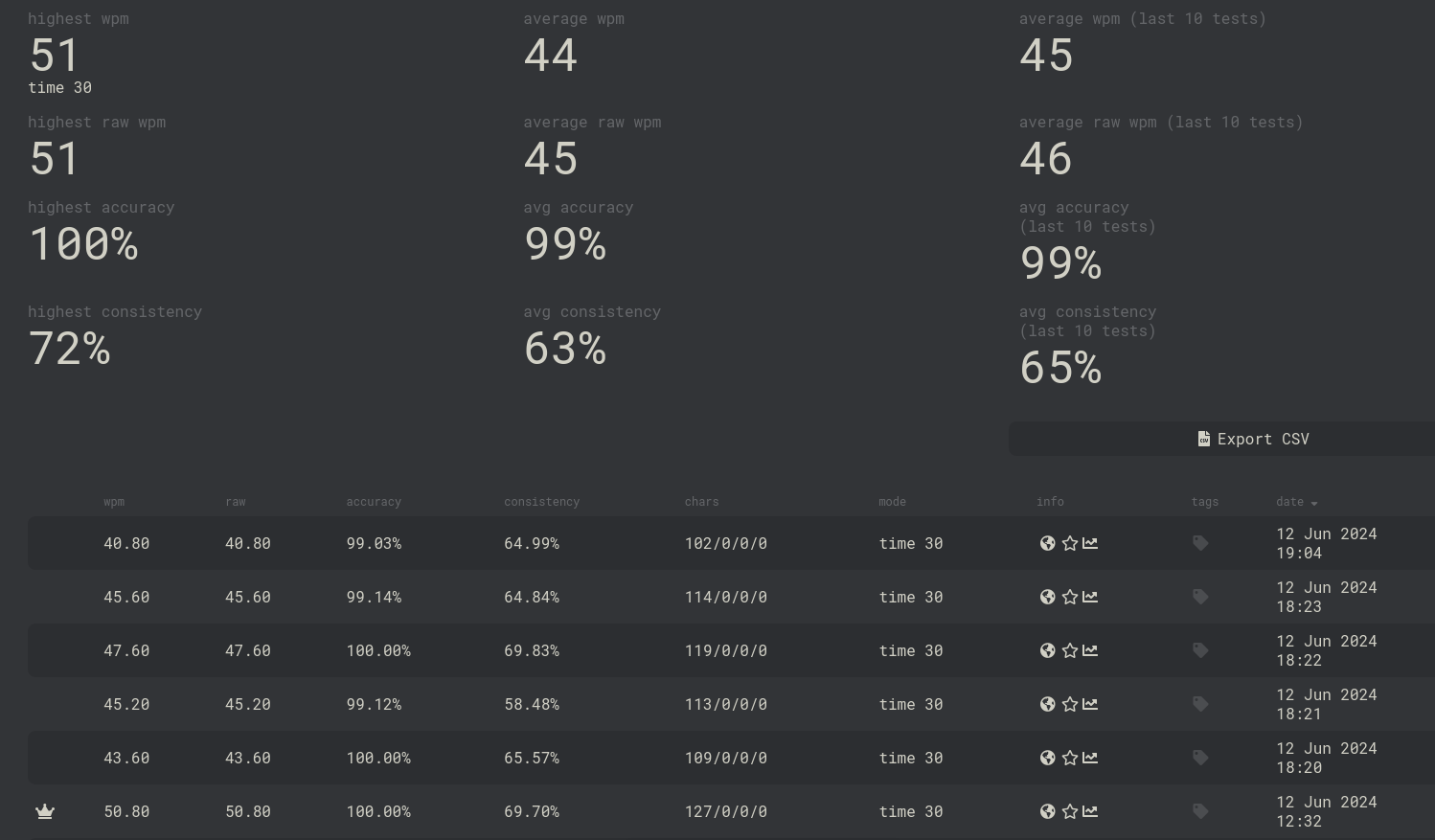
- After lvl 31, started velocity training. See results of first attempt, also compared with a quick switch over to Dvorak:
 |
| 3L |
 |
| Dvorak (tested immediately afterwards) |
- Attempted to create a new layout for Emacs Xah Fly keys mode. See my repo (links will open in new window). Still a work in progress but initial testing works:
;; create a new layout;; 3L with dead keys represented as _(puthash "3l" "_ 1 2 3 4 5 6 7 8 9 0 _ __ 1 2 3 4 5 6 7 8 9 0 _ _q f u y z x k c w b _ _ \\o h e a i d r t n s _, m . j ; g l p v _Q F U Y Z X K C W B _ _ _O H E A I D R T N S _, M . J ; G L P V _" xah-fly-layout-diagrams)
May 18th, 2024 (After Shabbat)
- Just realized why typing feels strangely comfortable. Fingers are either straightened for top row or flexed for bottom row. Only index fingers are moved laterally and no over-extensions, all keys and symbols within reach.
May 19th, 2024
- Fully committed on FreeBSD, setting my /usr/local/etc/X11/xorg.conf.d/00-keyboard.conf to:
Section "InputClass"Identifier "Keyboard1"MatchIsKeyboard "on"Option "XkbLayout" "us"Option "XkbVariant" "3l"Option "XkbOptions" "ctrl:swap_lalt_ctl,ctl:swap_ralt_rctl,shift:both_capslock"EndSection
May 24th, 2024
After some experimenting, decided to utilize Right-Alt as Cur key, similar to Neo based layouts and further reduce right pinky usage. Added benefit of having it act as a Cur 'lock'. Consulting man xkeyboard-config, resulted in the following XkbOptions
Option "XkbOptions" "ctrl:swap_lalt_ctl,shift:both_capslock,lv5:ralt_switch_lock"
Conclusion
WPM are steadily increasing and I am now comfortable enough using it on a daily basis, typing as low as 40 wpm. I only regress to Dvorak when I get in the flow state and start approaching 60 wpm and some of the bi-grams are still troublesome for me (ou, mo, ma, me) but I'm getting used to them.
This is definitely worth the effort of learning and the layers / levels are game changing